The debug layer for physical AI
The world breaks. Experts fix it.
AI should learn how.
We record how experts debug the physical world. The reasoning, the failed attempts, and the verified fix. Every decision that teaches a machine why.
- Real faults
- Full decision loops
- Expert-reviewed
01Who it’s for
For teams teaching machines
how experts fix things.
AI teams buy the episodes. Repair shops and their technicians record them, on real jobs.
-
Our customers
AI teams building physical AI
Labs and companies that need to see how an expert reasons through a fault, not only what their hands did.
- Models that reason about the physical world, and the tests that evaluate them
- Copilots that guide a technician through a diagnosis
- World models that predict how physical systems behave
- Next: labs training robots to do the work
-
Where it’s recorded
Working repair shops
Real faults that come in the door, in trades where finding the cause takes an expert. A pilot starts with one trade, for example:
- Phone repair
- Ceiling fans
- Distribution boards
- Sockets and wiring
- Water pumps
-
Who records it
Expert technicians
They wear the head unit while they work, tap a marker at the moments that matter, and explain their thinking afterwards in their own words, in English or Urdu.
02The missing layer
Doing is visible.
Diagnosing isn’t.
A successful demonstration shows what worked. It leaves out the uncertainty, the wrong turn, and the test that changed the expert’s mind. That’s the data we’re building.
| Captured today | The missing layer |
|---|---|
| What the expert did | Why they did it |
| Hands, tools, the finished repair | The hypothesis, before the outcome was known |
| Successful runs, filmed cleanly | The measurement that changed their mind |
| Sold by the hour | The attempt that ruled something out |
| Millions of hours of it already exist. | Almost nobody is recording this. |
Reasoning in context
Capture the expert’s hypotheses alongside the real fault, while the work is happening.
Beyond task video
The wrong turns, too
A failed attempt rules something out. We keep the dead ends that explain the next decision.
Negative data is valuable data
A fix you can check
The episode ends on camera with the fix working, and the technician’s answer to “How do you know it’s fixed?” What they say and what the camera shows stay separate.
Evidence over assertion
03The episode
The episode
is the product.
One phone repair. From “won’t charge” to a verified fix. Explore the decisions between the two.
Illustrative episode from the pitch deck.
EP-0417 · Phone repair
Reported
A phone that won’t turn on.
The phone is dead and won’t charge. The reported symptom starts the episode; the cause is still unknown.
The starting point
“Phone dead. Won’t charge.”
Record the fault before an intervention. A symptom is the starting point, not a diagnosis.
Example record · not a real customer episode
What the expert says is their account. The video shows what happened. Both are kept, side by side.
04The head unit
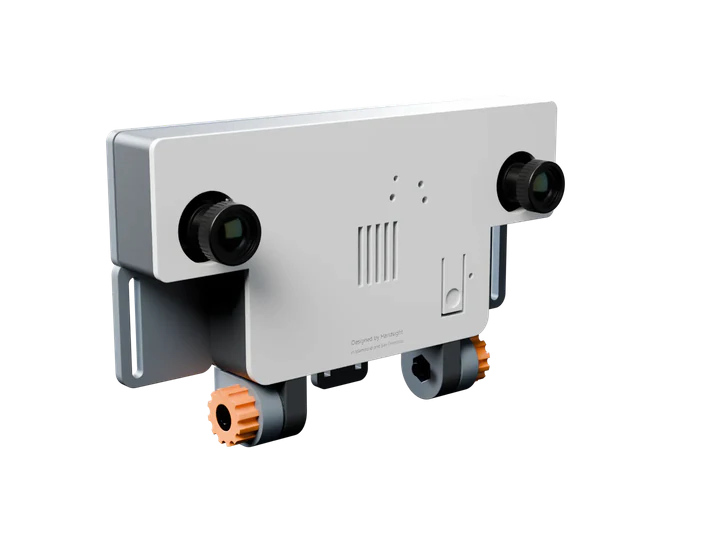
Two cameras. Two mics.
One button.
The head unit records what the technician sees and says, to its own card, and uploads it over Wi-Fi. Scroll to take apart the enclosure we’re building it into.
Skip the teardownWorn at the bench.
The cameras look where the hands work.
Strap shown is a concept · figure is illustrative

Take it apart · 6 parts, in the order they come apart
Teeth hold the angle; the orange knob locks it.
Mic holes, air vents, and a record button you press through the lid.
Two cameras, looking out through the lid.
Records to its own memory card. Powered over USB-C.
Rests on the forehead; the head strap clips on here.
Holds the board and both cameras.
135 × 84 × 22 mm · a render, not a production photo


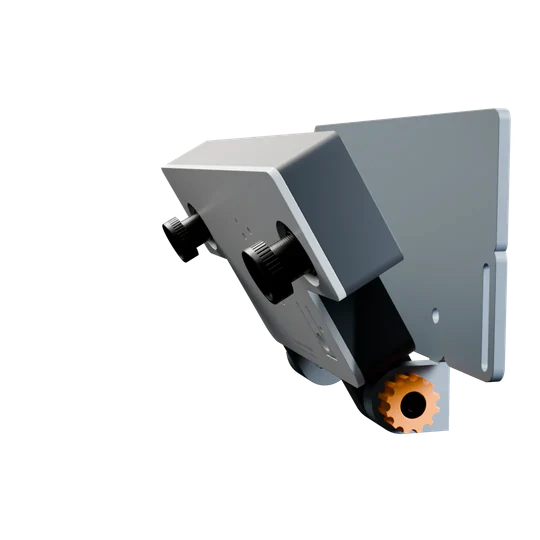
Tilt it down to the work.
The hinge sets in 10° steps, from level to 50° down. Teeth hold the angle and the orange knob locks it.
Seen from the front right · Shown at 30°.
Strap shown is a concept · figure is illustrative
What records today
Built- 2cameras
- 2microphones
- 1button to record
- Cardrecords on the unit
- Wi-Fiuploads by itself
- USB-Cpower
Technical specs
Head unit
- Cameras
- 2 cam0 and cam1, ~25 fps, H.265
- Microphones
- 2 24-bit, 48 kHz
- Controls
- 1 button 2 status lights; the lid flexes and a nub presses switch SW3
- Storage
- microSD card on the board’s left side; records to its own card
- Link
- Wi-Fi pairs with the phone by an 8-character code
- Power
- USB-C wired, on the board’s bottom edge
Enclosure
- Size
- 135 × 84 × 22.1 mm including the strap ears and the cable tab
- Parts
- 6 lid, camera modules, main board, base shell, tilt hinge, forehead plate
- Tilt
- 0–50° down 10° steps; knuckle teeth clamped by an orange M4 knob
- Strap
- Forehead plate strap ears with slots; the strap shown is a concept
Upload
- Files
- 4 kinds video.mp4 (cam0 and the mics), cam1.mp4, voice notes (.m4a), meta.json
- Order
- Manifest last meta.json goes up after the media, so nothing is read half-written
- Route
- Unit to cloud over the shop’s Wi-Fi; the phone never carries the video
Phone app
- Video
- 1080p 720p and 480p selectable
- Motion
- ~50 Hz on the video timeline
- Per recording
- Up to 15 min pause up to 10
- Upload
- Automatic on Wi-Fi picks up where it left off
- Language
- English, Urdu
- Platform
- Android
Head-unit frame rate and audio format come from test recordings. Camera sensor, resolution and field of view are still to be confirmed. Motion data comes from the phone, on phone recordings.
Two layouts, same parts
05One recording, end to end
Follow one recording.
From the bench to a verdict.
The same phone repair, EP-0417, recorded on the head unit, stage by stage. Where a stage is still being built, it says so.
Builtworking in our app and portal today
Planneddesigned, not running yet
Illustrative episode. Not a real customer recording.
Skip the walkthrough-
01 Assign and pair
The office assigns a head unit to a technician. Their phone finds it on the shop’s Wi-Fi and pairs itself with the unit’s 8-character code.
-
02 Pick the job
Before recording, the technician picks the job and answers one question: was the fault real, or set up? Start stays off until both are answered.
-
03 Record
Both cameras and both mics record to the unit’s card. Start and stop from the phone or the button on the unit. Tap a marker at the moments that matter: testing, ruled out, fixed. If the phone drops off, the unit keeps recording.
Phone camera instead? It adds a live coach (covered lens, too dark, blur, long silence) and records how the phone moves.
-
04 Explain it
After the stop, six questions, from “What did you think was wrong?” to “How do you know it’s fixed?” Each answer can carry a voice note.
The six questions
- What were you trying to do?
- What did you think was wrong, and why?
- What did you actually do, in order?
- What did you measure or see?
- How did it end?
- How do you know it is fixed?
The episode leaves the device
-
05 Upload
The head unit uploads its own files over Wi-Fi: both camera views, the audio and the voice notes. The phone never carries the video.
Phone recordings upload on Wi-Fi by default, in parts that pick up where they left off.
-
06 Automated audit
An automatic gate will turn away black, frozen or unreadable footage, blur faces and screens, and transcribe what was said, before anyone reviews it. It isn’t running yet: today every episode goes straight to a person.
-
07 Ready for review
On the review portal, the episode is indexed and laid out for review: both camera views, the voice notes and the typed answers, side by side.
-
08 Expert review
An expert watches it and accepts or rejects it. A rejection needs a reason. Every view and every decision is written to an audit log.
Earlier: EP-0416 was rejected, “Lens covered for four minutes”, and recorded again as EP-0417. Planned Sending that reason to the technician’s phone.
-
09 Accepted
A fault the technician marked real, both camera views, their own account, and an expert’s sign-off. That’s an accepted episode.
Next on the line
Verdict back to the phone
PlannedThe technician sees accepted or rejected, with the reason.
A week later
PlannedA check that the fix held, and the technician is paid.
Delivered to your lab
PlannedPackaged with provenance: file hashes and a pseudonymous collector ID, with the trace and the voice notes.
06From the shop floor
Short clips.
Real diagnosis.
Short clips from real repairs will appear here: the moment a hypothesis forms, the measurement that contradicts it, and the check that confirms the fix.
Clip in preparation
Clip in preparation
Clip in preparation
Clips are excerpts. Full episodes carry the camera views and audio, the technician’s tap markers, and their answers to six questions, each with a voice note.
07Pricing
Pay for accepted episodes.
Nothing else.
You set the acceptance criteria before we record. An expert checks every episode against them, and you pay only for the ones they accept.
-
Start with a paid pilot
100–200
episodes, in one trade
We agree the acceptance criteria with you, and quote a price per accepted episode, before recording starts.
-
An expert reviews each one
100%
of episodes reviewed
Every episode is accepted or rejected against your criteria. A rejection always comes with a reason.
-
Pay per accepted episode
$0
for a rejected episode
You are billed for accepted episodes only. A rejected one costs you nothing.
Every accepted episode includes
- A real fault, marked real by the technician
- Both camera views and the audio
- The technician’s markers: testing, ruled out, fixed
- Their answers to six questions, with voice notes
- The expert’s verdict
08Let’s build your dataset
Start with one trade.
Learn from every turn.
A paid pilot of 100–200 episodes. Agreed acceptance criteria. Real faults, expert reasoning, and an expert’s verdict on every episode.
- 100–200
- episodes
- 1
- trade to start
- Full loop
- every decision
Technician or repair shop? We’d love to hear from you, too.